
Overview
The Agent Availability Status feature provides agents with the ability to manually set their current availability on the platform. This feature is designed to improve team visibility and coordination by allowing colleagues to see whether an agent is actively working, temporarily away, or offline.
An agent's status is displayed as a colour-coded icon next to their profile name.
How to Set Your Availability Status
Agents can update their status at any time by following these steps:
- Click on your profile dropdown menu, located in the top-right corner of the screen.
- Select 'My profile' from the menu.
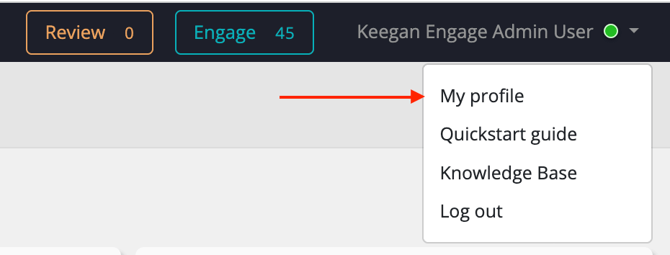
- Navigate to the 'Set status' section within your profile settings.
- Choose one of the three available status options:
- Active
- Away
- Offline
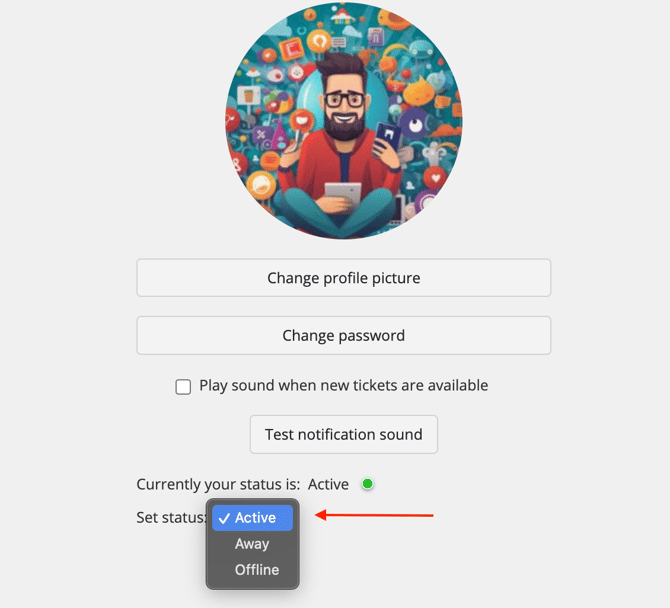
Your status will update immediately and be visible to other team members.
Status Indicators
The icon next to your profile will change colour to reflect the status you have selected:
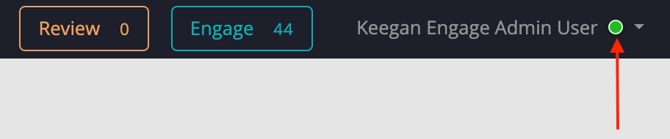
- Green Icon: Indicates your status is set to 'Active'.
- Orange Icon: Indicates your status is set to 'Away'.
- Grey Icon: Indicates your status is set to 'Offline'.
Reporting
In order to see the total amount of time an agent has spent in each status, go to ‘Reports > User performance Report’. 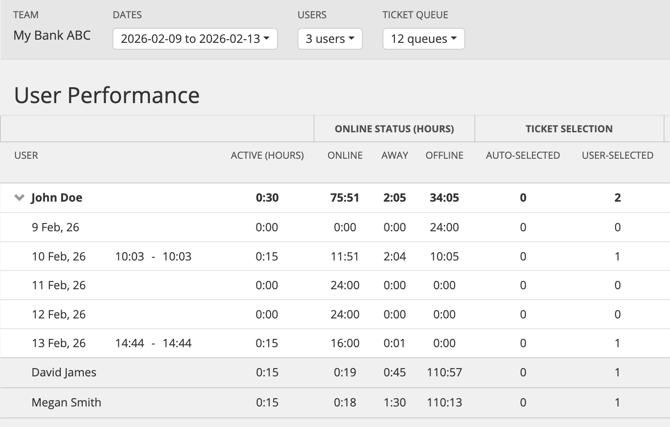
To get a detailed export showing the times an agent has updated their status select ‘Download Audit Log’.
Key Considerations & FAQ
Please review the following information regarding the functionality of this feature:
Q: Does the availability status time out or change automatically?- A: No. The status is not automated. Once set, it will remain unchanged indefinitely until you manually select a different status.
- A: Yes. Your availability status is purely an indicator for your team. It does not restrict your access or impact your ability to view, edit, or work on tickets.
- A: No. There are currently no reporting features available to track agent status or status history.
If you have any technical questions or feedback, let us know at support@dataeq.com