---
title: How to Add Metrics and Drill Downs in Analyse
description: Learn how to add and customise metrics and drill downs in Analyse to enhance your dashboards and gain deeper insights.
---
[Skip to content](https://dataeq.com/knowledge-base/how-to-add-metrics-and-drill-downs-in-analyse#main-content)
[](https://www.dataeq.com)
Open main navigation
Close main navigation
- Contact us
Contact us
How can we help you?
- There are no suggestions because the search field is empty.
1. [Knowledge Base](https://dataeq.com/knowledge-base)
2. [Analyse](https://dataeq.com/knowledge-base/analyse)
3. [Metrics and Drill Downs](https://dataeq.com/knowledge-base/analyse#metrics-and-drill-downs)
# How to Add Metrics and Drill Downs in Analyse
## Learn how to add and customise metrics and drill downs in Analyse to enhance your dashboards and gain deeper insights.
Metrics and drill downs in Analyse help you **visualise data trends** and **explore insights** without changing your core filters. **Metrics display key data points**, while **drill downs allow you to break down data further** (e.g., by brand, sentiment, or time period).
---
#### **How to Add a Metric to Your Dashboard**
1. **Log in to Analyse** at[https://analyse.dataeq.com](https://analyse.dataeq.com/).
2. Open a **dashboard** where you want to add a new metric.
3. Scroll to the bottom of the dashboard and click **Add Metric**.
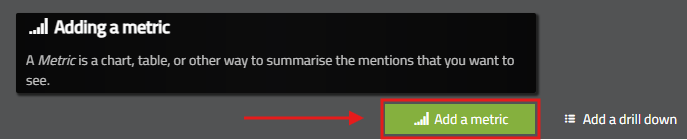
4. Browse available metric categories (e.g., **overview, priority conversations, customer experience, risk factors, themes, etc**).
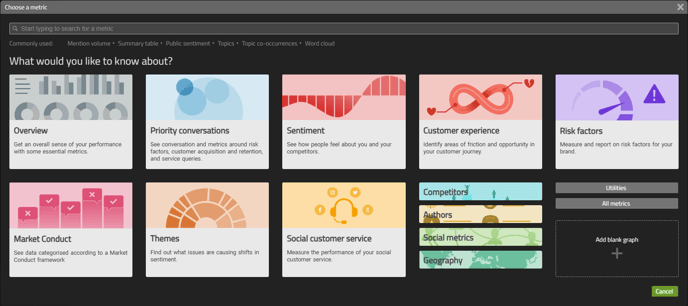
5. Click on the **metric** you want to add.
6. (Optional) Click the **edit icon** to customize the metric’s filters, time range, or data sources.
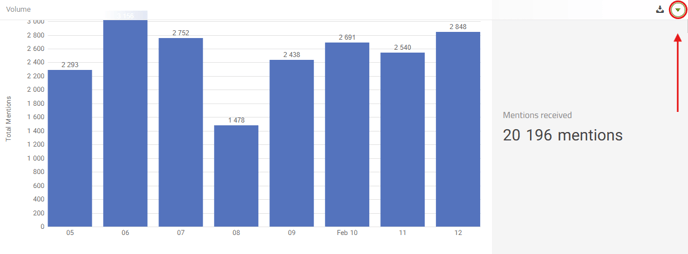
7. Click **Save** to apply the changes.
**Tip:** You can add multiple metrics to a section to **compare different data points** in one place.
---
#### **How to Add a Drill Down to a Dashboard Section**
Drill-downs allow you to **filter a dashboard section dynamically** without permanently changing the dashboard’s core settings.
1. Open the **dashboard** where you want to add a drill down.
2. Scroll to the bottom of a section and click **Add Drill Down**.
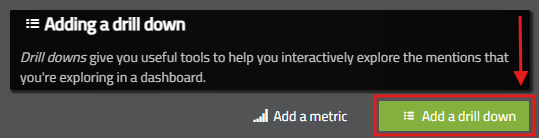
3. Choose a drill down type (e.g., **brand, sentiment, date, author, topic**).
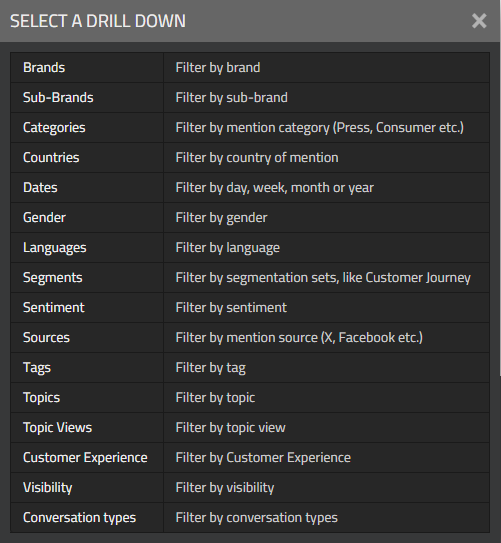
4. Click **Save** to add the drill down.
5. Click on the **drill-down dropdown menu** in the section to switch between data segments.
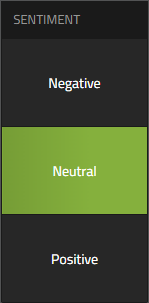
**Example:** If you add a **Sentiment Drill Down**, you can toggle between **positive, neutral, and negative** mentions without adjusting the main dashboard filters.
---
#### **Best Practices for Using Metrics & Drill Downs**
- Use **metrics** to track trends such as **mention volume, sentiment shifts, and customer interactions**.
- Add **drill-downs** to quickly compare **brands, periods, or topics** without modifying dashboard settings.
- Keep your dashboards **clean and structured** by organising **related metrics into the same section**.
- Test different **visualization types (e.g., bar charts, line graphs, tables)** to find the best format for your insights.
---
#### **Troubleshooting Metric & Drill Down Issues**
1. **Issue: "I don’t see my metric after adding it."**
1. Refresh the page and check if the metric appears in the dashboard.
2. Ensure you have **selected and saved a valid metric type**.
2. **Issue: "My drill down isn’t changing the data."**
1. Confirm that the drill down type is **compatible with the dashboard filters**.
2. Try selecting **a different drill down category** (e.g., if a brand drill down isn’t working, try a sentiment drill down).
- [Analyse](https://dataeq.com/knowledge-base/analyse#main-content)
- [Metrics and Drill Downs](https://dataeq.com/knowledge-base/analyse#metrics-and-drill-downs)
- [Exploring Authors](https://dataeq.com/knowledge-base/analyse#exploring-authors)
- [Alerts and Notifications](https://dataeq.com/knowledge-base/analyse#alerts-and-notifications)
- [The Reports Panel](https://dataeq.com/knowledge-base/analyse#the-reports-panel)
- [Getting Started on Analyse](https://dataeq.com/knowledge-base/analyse#getting-started-on-analyse)
- [Visualising Conversation Topics](https://dataeq.com/knowledge-base/analyse#visualising-conversation-topics)
- [Mentions Panel](https://dataeq.com/knowledge-base/analyse#mentions-panel)
- [Labelling Data](https://dataeq.com/knowledge-base/analyse#labelling-data)
- [Filtering and Analysing Data](https://dataeq.com/knowledge-base/analyse#filtering-and-analysing-data)
- [Engage](https://dataeq.com/knowledge-base/engage#main-content)
- [User Roles & Permissions](https://dataeq.com/knowledge-base/engage#user-roles-permissions)
- [Reporting and Analytics](https://dataeq.com/knowledge-base/engage#reporting-and-analytics)
- [Additional Features](https://dataeq.com/knowledge-base/engage#additional-features)
- [Tips & Troubleshooting](https://dataeq.com/knowledge-base/engage#tips-troubleshooting)
- [Ticket Management](https://dataeq.com/knowledge-base/engage#ticket-management)
- [Getting Started](https://dataeq.com/knowledge-base/engage#getting-started)
- [Working with Tickets](https://dataeq.com/knowledge-base/engage#working-with-tickets)
- [Publish](https://dataeq.com/knowledge-base/publish#main-content)
- [Multi-Platform Publishing](https://dataeq.com/knowledge-base/publish#multi-platform-publishing)
- [Getting Started with Publish](https://dataeq.com/knowledge-base/publish#getting-started-with-publish)
- [Creating and Managing Content](https://dataeq.com/knowledge-base/publish#creating-and-managing-content)
- [Campaigns and the Content Calendar](https://dataeq.com/knowledge-base/publish#campaigns-and-the-content-calendar)
- [Approval Workflows](https://dataeq.com/knowledge-base/publish#approval-workflows)
- [Reporting & Logs](https://dataeq.com/knowledge-base/publish#reporting-logs)
- [Glossaries](https://dataeq.com/knowledge-base/glossaries)
- [Data Source Information](https://dataeq.com/knowledge-base/data-source-information#main-content)
- [What can we collect?](https://dataeq.com/knowledge-base/data-source-information#what-can-we-collect)
- [Platform FAQs](https://dataeq.com/knowledge-base/data-source-information#platform-faqs)
[-1.png?width=90&height=32&name=DataEQ_Logo_FOR%20USE%20ON%20LIGHT%20BACKGROUND.png%20(1)-1.png "Chill listening crop-3")](https://25676464.hs-sites-eu1.com/)
Copyright © 2025, DataEQ