
Social teams can now manage ad campaigns on Meta (Facebook and Instagram), X and TikTok from one platform. Campaigns run from the same tool as organic posts, without opening each platform's ads manager. For clients already planning content in Publish, ads now go through the same approval steps as posts, and their results sit alongside organic performance.
Manage Meta, X and TikTok ads from one tool
Campaigns, ad sets and ads follow the same structure as each platform's own ads manager, so media teams can work in Publish without remapping how they organise spend.
At ad set level, teams can:
- Target by location, demographics and interests
- Choose placements, and set the budget and schedule
- Run several ads in one ad set to compare creative
- Preview each ad in feed, Stories, Reels and profile placements before anything goes out
Billing, spend limits and account permissions stay in each platform's business account, so the budget remains under your organisation's control.
Your team builds campaigns in the same place the creative was approved, rather than rebuilding them platform by platform.
From set-up to live
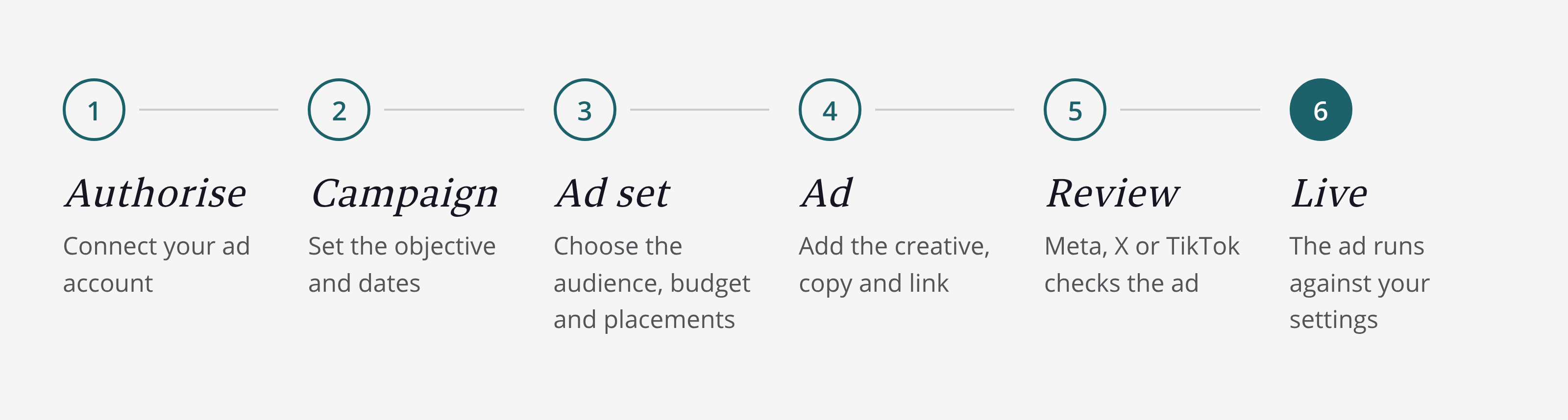
Connect your ad account, set the campaign objective and dates, then build the ad set and add the creative. Meta, X or TikTok reviews the ad, and once approved, it starts running with the audience, budget and schedule you set.
Paid and organic social media reporting
In Publish, every post and ad has its own performance view, and a campaign overview dashboard breaks spend, clicks and cost down by profile.
DataEQ Analyse goes further. It tracks 15 advertising metrics, from ad spend, cost per click and cost per mille to link clicks, outbound clickthrough rate and frequency, next to organic engagement. Results can be compared by campaign, ad set or individual ad.
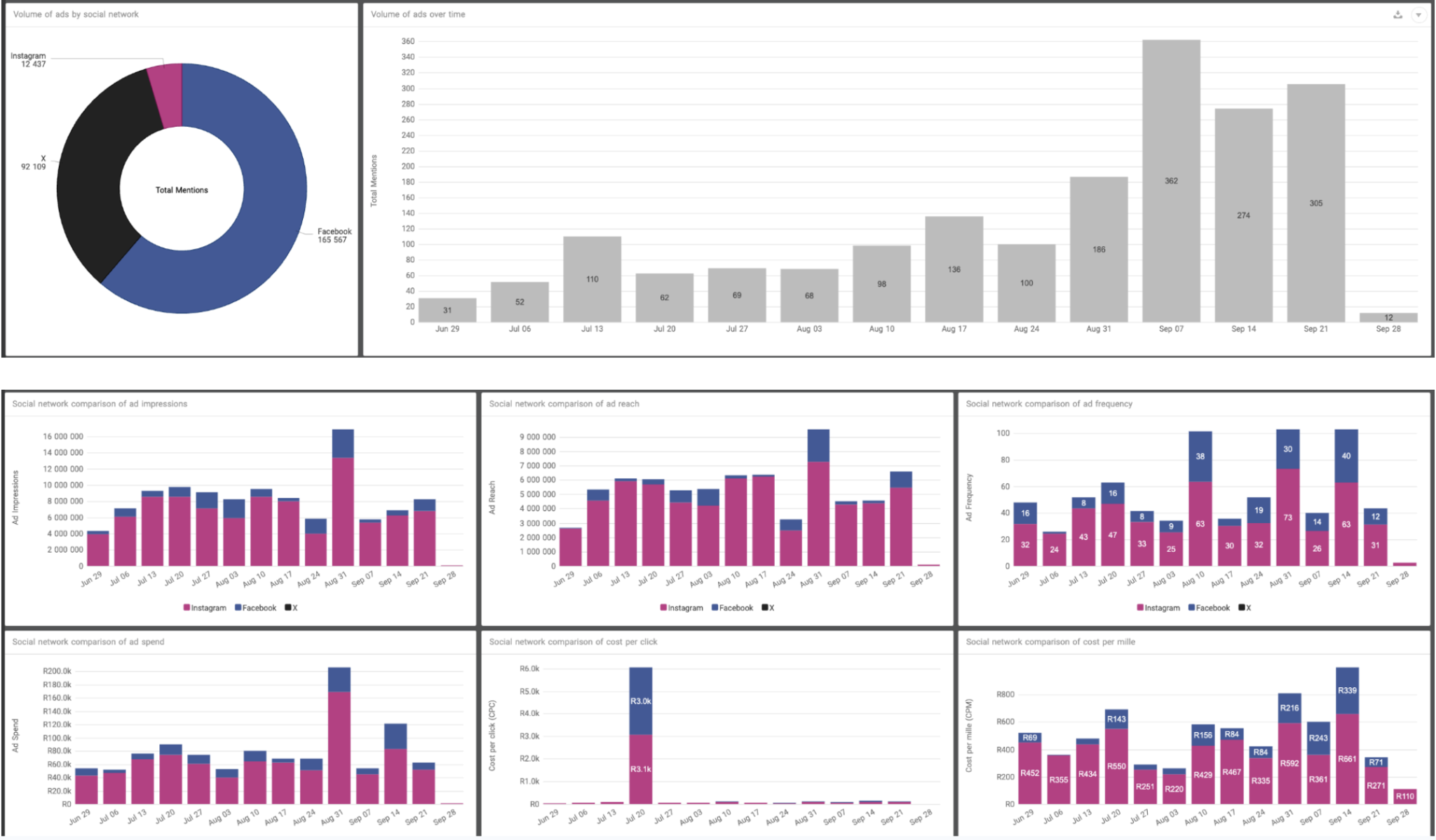
With both in one place, teams can see what paid adds to their organic results, instead of piecing it together from separate platform reports.
Publish at a glance
Paid campaigns build on the organic workflow Publish already runs:
- Supported platforms: Organic posts for Facebook, Instagram, LinkedIn, X, TikTok and YouTube sit in one calendar view. Filter by campaign to see a launch end to end, or by approval status to see what's still waiting.
- Formats that fit the platform: Write threads for X, run polls and post PDF carousels on LinkedIn, and schedule Stories and Reels on Facebook and Stories on Instagram.
- A shared asset library: Images, videos and copy live in one place, so the team isn't hunting for the latest version of a file.
- Sign-off built in: A trainee can draft but can't publish. Their post goes to an approver, who gets an email, and the audit log records who approved what.
- Tracking from the start: Tag posts by campaign, product or hashtag and add UTM links before publishing, so reporting doesn't rely on anyone remembering later.
Built for brands that can't afford mistakes
For teams in regulated or high-profile industries, the risk in social media isn't only a post that underperforms. It's a post or ad that goes out before it's ready. Publish keeps planning, approval and publishing in one workflow, for organic and paid alike, so the same standards apply to everything that carries your brand.
Publish is part of DataEQ's marketing solution, alongside Engage for social customer service and Analyse for monitoring, measuring and benchmarking performance.
Ready to run paid campaigns from Publish? Existing clients can speak to their Account Manager about getting started. To find out more, visit dataeq.com/solutions/marketing.